The following set of
posts will discuss the setup, and integration concepts for the Common Data
Service. I do want to provide my gratitude to Tribridge for allowing me to be
part of a project where the Common Data Service was needed.
In case, you the
reader, don't know about the Common Data Service, in a nutshell "The Common Data Service is the Microsoft Azure–based business
application platform that enables you to easily build and extend applications
with their business data. The Common Data Service does the heavy lifting of
bringing together your data from across the Dynamics 365 family of services so
you can focus on building and delivering the apps, insights and process
automation that matter to you and your customers with PowerApps, Power BI, and
Microsoft Flow."
The content will be
divided in small posts, which be accessible from the links below. Please see of
the preliminary information we gathered while setting up the environments
needed for this project.
Prerequisites
In order to create
new Power Apps CDS projects the following is needed:
- Global Admin role in an
Office 365 tenant where Dynamics 365 for Operations and Dynamics 365 for
Sales.
- KB4036524 - This hotfix
enables sales order line synchronization with the Data Integration feature
from Finance and Operations to Sales..
- KB4036461 - This hotfix
enables sales order synchronization with the Data Integration feature from
Finance and Operations to Sales.
- Prospect to cash solution for
Dynamics 365 for Sales, version 1.14.0.0 (v14) or later. (https://mbs.microsoft.com/customersource/Global/365Enterprise/downloads/product-releases/MD365FNOPENTProspectToCash). (Done for D365 for Sales
Customer Engagement).
- Microsoft Dynamics 365 for
Finance and Operations, Enterprise edition July 2017 update with Platform
update 8 (App 7.2.11792.56024 w/ Platform 7.0.4565.16212). Support for App
7.1 will be added with a hotfix.
- Dynamics 365 Sales,
Enterprise Edition. The integration solution is compatible with Microsoft
Dynamics 365 Customer Engagement Version 1612 (8.2.1.207) (DB 8.2.1.207)
online.
- An environment in the Common
Data Service. The environment must have a database for integration and you
must be an environment administrator for that database.
Solution Flow
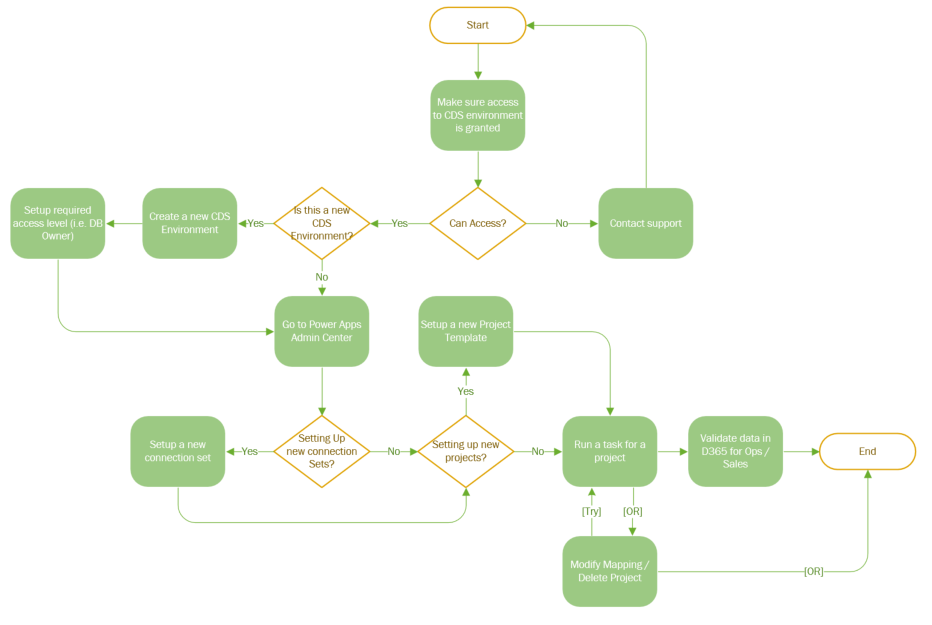
The following is our
vision of the entire process (at a very high-level).
Content Links