Tuesday, February 18, 2014

Microsoft Dynamics AX 2012 R3 - New Data Import Export Framewrok Changes


Hi There!

I hope everybody is doing great! I had the opportunity to attend to the MS AX 2012 R# Tech Conference thanks to TriBridge.

In this post I would like to discuss the new Data Import Export Framework or DIXF. As you probably know by now, this new framework is shipped with both CU7 and R3.

So, what can new DIXF do? Well to start, one of the few new key features is that the DIXF runs on top of the SSIS service interface allowing incremental runs (UPSERT). Of course, it can import/export data, and Microsoft added the capability to compare and copy data between instances as well. In addition, the new DIXF version ships with the ability to choose different data sources such as text, MS Excel, and XML files.

Further, the new DIXF can be used to extract data directly from various ODBC*** sources such as SQL, MS Access, and MS Excel. This new additions will help us streamline our data migrations and data transfers much better.

***For ODBC types we are going to have to provide a connection string in order to simplify the data selection process. The one cool thing I saw was that we can create new rows under Mapping Details to add mandatory fields i.e. ACCOUNTNUM in case a specific legacy system does not include it.

When this scenario is true, the custom value provided can be automatically filled by a number sequence value (if we want to) by choosing the “AUTO” option in that specific row, which would take a new AccountNum from the numbering sequence system. However, we can also choose to have default values as in older versions.

In terms of the DIXF entities, the new DIXF ships with a 150 entities in comparison to the 78 (I think) it came with in earlier versions. These include master data, documents, journals, parameters, party, products, and configuration data.

Another cool addition is the addition of folder support. We are going to be able to move stuff around automatically (needs to be pre-defined) to different folders in our domain based on the operations we are executing.

The following are a few other additions:

Parallel Execution: Ability to dissect data in bundles (i.e. 1,000 rows / bundles = 100 rows per task).

This is particularly useful when large data loads need to take place. The tool provides the ability to allocate a group of records to tasks. This combination will create a bundle, and each bundle is independent of each other. See the following diagram for a visual representation of it:


Role Base Security: Provides a security framework for the different levels on an organization, this is built on top of the existing security framework (i.e. Production cannot import HR data).

Mapper Control: Allows flexible mapping between custom entities and staging objects. In addition, mapping effort is reduced when using AX friendly column names (i.e. ITEMID).

Custom Entity Wizard: We can compare data in different companies. This becomes specially interesting and useful to compare parameter data between a gold and test instances for example.  When using this tool to import data that contains discrepancies, the system inserts the data into a staging table where it is compared by another process in a specific number of companies and/or instances, and finally it gets updated.

At this point, a user can use the Comparison form to move records between different instances.

See the process in the following diagram:


NOTE: Sometimes the entity Wizard will only create a portion of the requirements and a technical consultant would have to finish the rest.

System Configuration Data: BI-Analysis and Reporting Services, Project Server Integration, EP, Batch Settings, Number Sequences, Email Parameters, AIF, System Service Accounts.

DIXF Import Process

The import Process us done by using an abstraction layer that uses SSIS behind the DIXF framework. Within this abstraction layer, we can add possible X++ customizations.

I asked the question on what would be the recommendation for migrating data from legacy systems – the following is what I could get from their recommendation (I was taking notes).There are two types of data migration architecture that consolidate both importing and cleansing data.

The first option is to have a middle tier that can process the data from a legacy system, to an external system and clean it before it goes to Microsoft Dynamics AX.


The second option is to do it directly import the data from a legacy system to Microsoft Dynamics AX. 


Microsoft recommends to keep the data cleansing business logic inside of AX. The reason is that Microsoft Dynamics provides a data migration framework that is both extensible and customizable. The framework provides entity classes that can be extended to a process specific needs. In addition to the entity classes, the framework also provides the ability to create custom staging entities for further processing prior to the final push to an entity. This can be depicted in the following picture:


The DIXF also provides a new error log preview function that allows a user to narrow down an error to the smallest unit possible to understand exactly where the error is occurring. This was not true in older versions of the DIXF. Further, the new DIXF also provides an Execution History function that allows a user to review and validate the staging data before the actual import to an entity.

DIXF Export Process

As mentioned earlier, because the DIXF also uses SSIS to export data from the framework, bulk exports can also be easily accomplished. In addition, as in older versions of DIXF, we can also generate our own source mapping and sample files. However, a cool new addition to the DIXF is that these files now can be of different types such as XLS, XML, Text, Tab delimited, Etc.

This approach sounds good and valid, however, in my mind here could be a double edge sword with the fact that XLS files might open the door for a few data consistency problems as this type of files can contain formulas. I would suggest to always understand your source files, especially our XLS ones.

DIXF Architecture

The following is the new DIXF architecture for R3.


Visit http://www.tribridge.com/ and learn about our Dynamics AX practice, services and focus, as well as our cloud services Concerto.


Sunday, February 2, 2014

Microsoft Dynamics AX 2012 R3 Tech Conference

http://www.microsoft.com/dynamics/axtechconference/Default.aspx
 

Hi there!
 
I will be attending to the Dynamics AX 2012 R3 tech conference in Seattle with my team members from TriBridge. In addition, in this post I would like to share the courses I will be taking at the Tech Conference and give my readers a snapshot of what each course is going to cover.

Finally, my goal will be to write a blog entry for each of the courses in depth. So follow my blog for the next couple of weeks as I will be posting very interesting information from these amazing courses.
 
In a nutshell, the Microsoft Dynamics AX Technical Conference 2014 begins on Monday February 3rd in Seattle (Bellevue, Washington).  As far as I know, this is yet the biggest event for the upcoming Dynamics AX 2012 R3 release, which will introduce many new features in both the technical and functional dimensions of the application.
 
Below is a list of the courses I will be taking and a brief description of each. I will link each of the titles below to a new blog post in the next few days, so be sure to check this page for updated information (Each title will be in blue when ready to be explored)
 

Day in the life of a Microsoft Dynamics AX Solution Architect
The main focus of this course will be to learn how the roles and responsibilities of a solution architect apply to the different phases of an implementation project. I will be enjoying this course.

Data import/export framework for Microsoft Dynamics AX 2012 R3
The focus of this course is to experience the new entity-based import/export framework, which will help us manage our import/export, integration, configuration, and data migration needs.

Automated deployment of AX 2012 R3 in Windows Azure using lifecycle services
I believe this course is critical to any solution and/or technical architect as well for any developers as it will allow us to learn about the new features that Microsoft has developed for lifecycle services that will automate the deployment of Microsoft Dynamics AX 2012 R3 environments with Windows Azure.

Building Microsoft AX services integration with the Microsoft Windows Azure Service Bus
As the one above, this course will also be critical for architects and developer alike. This course will cover the new Windows Azure Service Bus Adapter for the Application Integration Framework, which will allow us to deploy Microsoft Dynamics AX Services through the Azure Service Bus, making Microsoft Dynamics AX Services accessible from the cloud.

Data synchronization to multiple instances of Microsoft Dynamics AX
This course will help us learn the Data Management (MDM) in Microsoft Dynamics AX 2012 R3, and how it simplifies master data synchronization across multiple Microsoft Dynamics AX instances by utilizing conceptual business entities, metadata, and declarative configuration.

Optimizing the performance of Microsoft Dynamics AX deployment
I'm really looking forward to this course as it will cover some techniques that could help us gain higher performance in our Microsoft Dynamics AX deployment. A few key points that will be introduced will be design-patterns, parameter configuration and implementation pit-falls.

Create Microsoft Dynamics AX builds using the new X++ server-side parallel compiler
In this course we are going to go through an overview of the new X++ server side parallel compiler as well as best practices on how to apply the new compiler in creating Microsoft Dynamics AX builds in the context of multiple development environments integrated via TFS version control.

Technical Deep Dive - warehouse management
This is a course that will be critical for me and I'm sure for the majority of Microsoft Dynamics AX professionals out there, as it will dive into the technical challenges for the new warehouse management inventory reservation system. by exploring the new data models as well as the interaction between work and reservations.

Warehouse and transportation management hands on experience
This will be an hands-on experience course to preview the functionality available in Microsoft Dynamics AX 2012 R3 for warehouse management and transportation management.

Tracking dimension at work! See the new item tracing, batch attributes-based pricing and batch merge within Microsoft Dynamics AX 2012 R3
This course will dive in to understanding how the potency of products is taken into account when calculating consumption for batch orders, leveraging potency pricing to improve the sales process and utilize the new batch merge capability to achieve a potency level requirement from a customer during sales.

This is all for now. Follow me on this adventure in both my blog and twitter.

http://www.microsoft.com/dynamics/axtechconference/Default.aspx


Tuesday, August 27, 2013

Create, Deploy, Troubleshoot and Consume external services in AX 2012 R2


Hi There!
 
I hope everyone is having a great week so far. Summer is almost over here in the US, and I feel like I haven't taken much advantage of it this year. The good thing, however, is that I have been able to really focus on service development lately, and a ton of other cool AX stuff.
 
On this post I would like to share with you how to Create, Deploy, Troubleshoot and consume an external service in AX 2012 R2. As we all know, this has changed dramatically from AX 2009 services. It used to be very easy to consume services in AX 2009 (you can see an example in my post Consume a Currency Exchange Rates Web Service from AX 2009 - WFC ).
 
In AX 2012 R2, however, this has become somewhat more involved. They are not necessarily harder to create and consume, but they require a few more steps to be setup. Now, the great advantage is that you can resolve the business logic either in the client itself (C# project) or in AX 2012 R2 (Server deployment). This comes handy for business that don't necessarily want to have an AX developer in house and/or large scale integration projects, among other reasons.
 
 
Let's get to it!
 
Open visual studio and create a new Class Library Project. Give it a name and click OK.


Right click the Project Name references folder and click the Add Service Reference button.


Paste the http://www.webservicex.net/genericbarcode.asmx?WSDL URL into the Address bar. This is a Barcode Generator service. Give it a name and click OK.


This will create a new Service Reference and a new AppConfig file where both the basic and custom bindings are automatically generated for you.


Right click the Project Name and choose Add "Service Name" to AOT. This will add the Csharp Project to the AOT under Visual Studio Projects/Csharp Projects.


Once the project has been added to the AOT, you can choose the following properties and deploy the service.


NOTE: If you choose to deploy to the server, you will need to enable Hot Swapping Assemblies on the server configuration file.  See the following for more info (http://msdn.microsoft.com/en-us/library/gg889279.aspx).  If you choose to do this, you will have to restart the AOS.


After it is deployed, you would add a code similar to the one below.
 
 
 static void TestBarcodeGenService(Args _args)
{
    Ed_SampleBarcodeGenerator.EdGenBarcode.BarCodeSoapClient service;
    Ed_SampleBarcodeGenerator.EdGenBarcode.BarCodeData barCodeData;
    System.Exception ex;
    System.Type type;
    ;

    try
    {
        service = new Ed_SampleBarcodeGenerator.EdGenBarcode.BarCodeSoapClient();
        service.GenerateBarCode(barCodeData, "0000992882");
    }
    catch(Exception::CLRError)
    {
        ex = CLRInterop::getLastException();
        info(CLRInterop::getAnyTypeForObject(ex.ToString()));
    }

}
 
 
 Well ... that's all for now folks. Stay tuned, there is going to be a huge load of useful information in the next few weeks.


Friday, August 23, 2013

Create a Transfer Journal using AX 2012 R2 Document Services and C#


Hi there,
 
On this post I would like to share some C# code to create a Transfer Journal using C#. I have written a few post in the past about services and they will help you understand how to create a service, service groups, deployment, etc.
 
Create Counting Journals
 
How to choose the right service
 
AX 2012 Services and AIF
 
Services Types
 
Creating a service in AX 2012
 
 
Back to the creation of a Transfer Journal with C#, this is an interesting code as we need to instantiate two different instances of the InventDim Table; InventDimIssue and InventDimReceipt.
 
InventDimIssue can be thought as the From values and InventDimReceipt can be thought as the To values (i.e. From Warehouse ==> To Warehouse).
 
In addition, another interesting point is that AX uses the InventJournalTable and InventJournalTrans for all the inventory journal entries, and we specified, in C#, which entity (AXD) will be using.
 
The following is the code:
 
 
private void InventTransferJourTest()
{
            InventTransferJournal.CallContext callContext = new InventTransferJournal.CallContext();


            InventTransferJournal.TransferJournalServiceClient servClient = new InventTransferJournal.TransferJournalServiceClient();

            InventTransferJournal.AxdTransferJournal transjournal = new InventTransferJournal.AxdTransferJournal();

            InventTransferJournal.AxdEntity_InventJournalTable journalheader = new InventTransferJournal.AxdEntity_InventJournalTable();

            //Header
            callContext.Company = "CEU";
            journalheader.JournalNameId = "TransferJourId";
            journalheader.Description = "Transfer Journal";
            //End header


            //Lines
            InventTransferJournal.AxdEntity_InventJournalTrans journalLines = new InventTransferJournal.AxdEntity_InventJournalTrans();


            journalLines.ItemId = "123456";
            journalLines.Qty = 45;
            journalLines.TransDate = DateTime.Now;


            InventTransferJournal.AxdEntity_InventDimIssue inventDimIssue = new InventTransferJournal.AxdEntity_InventDimIssue();

            inventDimIssue.InventBatchId = "RUT";
            inventDimIssue.InventLocationId = "21";
            inventDimIssue.InventSiteId = "1";


            journalLines.InventDimIssue = new InventTransferJournal.AxdEntity_InventDimIssue[1] { inventDimIssue };

            InventTransferJournal.AxdEntity_InventDimReceipt inventDimReceipt = new InventTransferJournal.AxdEntity_InventDimReceipt();

            inventDimReceipt.InventSiteId = "2";
            inventDimReceipt.InventLocationId = "11";
            inventDimReceipt.InventBatchId = "RSR";


            journalLines.InventDimReceipt = new InventTransferJournal.AxdEntity_InventDimReceipt[1] { inventDimReceipt };
            //End Lines


            journalheader.InventJournalTrans = new InventTransferJournal.AxdEntity_InventJournalTrans[1] { journalLines };

            transjournal.InventJournalTable = new InventTransferJournal.AxdEntity_InventJournalTable[1] {journalheader};

            try
            {
                servClient.create(callContext, transjournal);
            }
            catch (Exception e)
            {
                MessageBox.Show(e.InnerException.ToString());
            }
}


 That's all for today and stay tuned as in the next few weeks I will be talking about TFS and how to work with AX 2012 in a way that we utilize the TFS server to its max capacity.

Have a great weekend!


Thursday, August 22, 2013

Create Counting Journal in AX 2012 R2 using Document Services


Hi There,

It has been a long time since I created my last post. I have been very busy learning new things about AX 2012 R2 and other related technologies such as the Data Import/Export framework, TFS and AX 2012, SharePoint Development for the Enterprise Portal, among other. Everything will come in its own time and I'm planning in sharing a lot in the weeks to come, so stay tuned!

On this post I would like to share some C# code to create a Counting Journal in AX 2012 R2 using the InventCountingJournalService that ships with AX. Let's keep in mind that the AX 2012 R2 document services are a extremely low cost option of providing this features to an external client with no AX development whatsoever.

So, I would like to start from the beginning:

1- Create a Service Group


2- Add the InventCountingJournalService to the Service Group

3- Deploy the Service Group. This will output the following.


4- Get the WSDL URI from the inbound ports form.


5- Go to Visual Studio, create a new windows form project, add a button and double click the button to create a button event.

6- Right - Click the Service References and choose Add Service Reference.


7 - Past the WSDL URI and click GO


8- Give your service a name i.e. InventCountingJournnal

9 - Write the following code and test.

 private void InventCountingJournal()
 {
            InventCountingJournal.CallContext callContext = new InventCountingJournal.CallContext();

            InventCountingJournal.CountingJournalServiceClient servClient = new  InventCountingJournal.CountingJournalServiceClient();

            InventCountingJournal.AxdCountingJournal countJournal = new InventCountingJournal.AxdCountingJournal();

            InventCountingJournal.AxdEntity_InventJournalTable journalHeader = new InventCountingJournal.AxdEntity_InventJournalTable();

            //Header
            callContext.Company = "CEU";
            journalHeader.JournalNameId = "CountJour";
            journalHeader.Description = "Counting Journal";
            //Header

            //lines
            InventCountingJournal.AxdEntity_InventJournalTrans journalLines = new InventCountingJournal.AxdEntity_InventJournalTrans();

            journalLines.ItemId = "12345";
            journalLines.Qty = 50;
            journalLines.TransDate = DateTime.Now;

            InventCountingJournal.AxdEntity_InventDim inventDim = new InventCountingJournal.AxdEntity_InventDim();

            inventDim.InventBatchId = "3";
            inventDim.InventLocationId = "1";
            inventDim.InventSiteId = "3";

            journalLines.InventDim = new InventCountingJournal.AxdEntity_InventDim[1] { inventDim };

            //Lines

            journalHeader.InventJournalTrans = new InventCountingJournal.AxdEntity_InventJournalTrans[1] { journalLines };

            countJournal.InventJournalTable = new InventCountingJournal.AxdEntity_InventJournalTable[1] { journalHeader };

            servClient.create(callContext, countJournal);
 }


You can test this by clicking the button, and calling this method. A new counting journal would be created in AX. Then, you can either have a batch posting all the journals or simply have a user doing it manually.

That's all for now!


Friday, April 12, 2013

SpotLight - From Power View to Cube


Hi there!

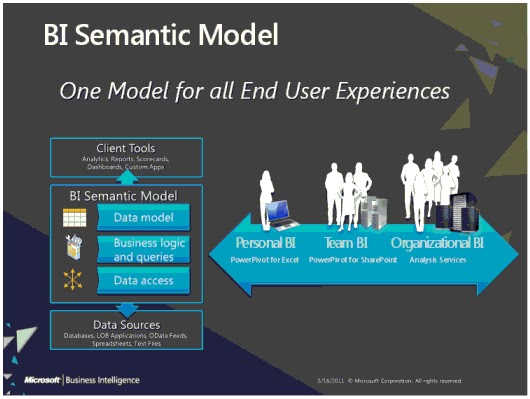
Today I would like to share a very interesting post written by Brandon George about the BI Semantic Model and its relationship to Microsoft Dynamics AX R2. 


On his post, he presents a broad overview of the BI Semantic Model and give us a full review of it by providing a set of posts to further our knowledge around extending, creating and deploying the solutions. It is just amazing to see how far Brandon has taken the BI Semantic Model, and I really thank him for sharing it with us.

From the post:

"you should see how simple it really is to empower yourself and your company or clients to truly start embracing the full BI Semantic Model. When Microsoft Dynamics AX is your system of record, and acting as your main data mart, then you have a great BI offering built right into the product."

You can access his post from here.


Thursday, April 11, 2013

AX 2012 CIL - How does it work?


Hi There,

On this post I would like to talk about a bit more about the CIL and what happens in the background. Recently I had to go through a process to find a CIL error I got after deploying a service. You can read my post solving the error "The CIL generator found errors and could not save the new assembly" for more information on this.

After digging a bit more on the CIL errors, I started researching on how exactly the NetModule files are generated under the XppIL folder and why. In addition, I also was intrigued by the source files and their relationship to debugging services and or batch jobs in Visual Studio.

Just for the record, I’m not an expert on this, and the following information has been taken from different sources and from my own experience in the past few hours being “exposed” to the services virus (it is kind of addictive).


So, what is CIL? CIL stands for Common Intermediate Language and it works together with the CLI or Common Language Infrastructure, which is basically a set of rules on programming languages that will compile with the CIL. I created a diagram to help me understand this concept on a visual way.

Please note that I took the diagram from a book, but I modified it to my own needs.


As you can see, now we have the ability to compile P-Code to CIL, and therefore AX 20212 is able to run X++ code directly into the CIL, which is much faster the P-Code compiler we had before.

As you probably know, we have two types of CIL compilations, the incremental CIL and the full CIL compilation. The major difference between the two of them is that the incremental CIL would compile only the objects that were modified since the last incremental compilation. For what I have learned, the full CIL generation is mandatory when we do modify anything on the XppIL folder.

On the XppIL folder, I noticed that we have a bunch of files there. These files are NetModule type files and they only contain type metadata and compiled code. It is important not to confuse a NetModule type file with .NET assemblies, as these contain and assembly manifest and managed code.


Now the really interesting portion of this is that within the XppIL folder there is a folder named “source”, and within this folder we find a bunch of files with the .xpp extension, which have x++ source code and are used to debug CIL code in Visual Studio when working with services and batches.


Further, another interesting point to this is that the “existence” of the source folder is directly related to our server configuration when choosing to enable debugging on the server.


Until the next post!

Solving the error " The CIL generator found errors and could not save the new assembly"


Hi There!

On this post I would like to discuss how to solve the CIL compilation error when deploying services for the first time in AX 2012. I have been working on a newly installed AX 2012 CU2 instance this week, and I deployed both basic and enhanced services.

This action was successfully done and I did not experience any issues. However, when I created a new service group and I deployed it, I encounter an error saying “The CIL generator found errors and could not save the new assembly”.


Now, this instance of AX 2012 is using a restored DB backup from another instance as I needed some data and objects already existing. It makes sense to think that this issue is true from the premise that I never went through a full AX and CIL compilation.

In addition, when generating the services through the installation, the references to the .NET Module File and the AX Application DLL were correct, but where they referring to the correct .NET Assembly types for the WFC generated endpoints?  I truly don’t know the answer to this and I asked for help.

My friend Bill Bartolotto (you can contact him here at his LinkedIn profile) went through this problem and he helped me solved it in my instance.  Bill has a vast experience in AX architecture and is really knowledgeable in AX 2012.

So, how do we fix this problem?

Step 1: Stop the AOS

Atep 2: Delete all of the source in the C:\Program Files\Microsoft Dynamics AX\60\Server\MicrosoftDynamicsAX\bin\XppIL directory

When you do this, just delete all the files within the XppIL folder that are outside of other folders. Make a backup just in case, and the files would be generated while the full compilation is taking place.


Step 3: Start the AOS


Step 3: Perform a full compile (it will not work without doing this)


Step 4: Perform a full CIL generation


The drawback of this fix is that it takes a long time to complete. However, this fixes the issue, which is the desired outcome, and the services deployment and incremental CIL compilations moving forward would be error free.

As you can see, the service was deployed correctly and if I opened my inbound port I'll see it there.


UPDATE:

After a FULL CIL compilation I got the following errors:

 
AOT > Class> ReleaseUpdateDB41_Basic
 
 
I just went to the object in question and compiled them separately.


The outcome would correctly compiled all the artifacts, including my new service gorup.


Until the next post!

Wednesday, April 10, 2013

How to choose the right service in AX 2012?


Hi there!

I hope you are having a great week. On today’s post I would like to discuss the difference between Document Services and Custom Services in AX 2012. Microsoft made a lot of changes from AX 2009 and AX 2012 and it seems to have created a sort of gray area on when to use a Document Service or a Custom Service.

Both document and custom services can handle any business entity. So, how do we know which one to use?

On one hand, the document services framework handles a lot of complexity out-of-the-box. For example, the framework parses the incoming XML, and validates it against a schema (XSD) document, and then the correct service action is called. This is simple as most of the logic that is needed to create, delete, update, etc. already exists, which simplifies the developer’s job. Now, what about sharing data contracts between applications?

On the other hand, custom services are flexible because they use the .NET XML serializer. The issue with this is that no validation is done, which creates a problem because any validation needs to be written in code by a developer.

However, custom services would allow us to share data contacts between applications, which is a plus in today’s world given the complexity of integration we are experiencing. For example, custom services would allow a company that uses AX 2012, SharePoint and .NET applications to share data contracts, making sure that the entities are the same for all the components of the architecture, and this is huge!


So, to summarize and share my own experience with services, I take into consideration the following rules when trying to decide which service to use:


Use Custom Services When
Use Document Services When
Exposing entities that have low complexity
Exposing entities that have a high complexity.
Sharing data contracts between company-wide applications
Data validation is required.
Creating logic that has nothing to do with the AX 2012 structures.
Inheriting logic to create, delete, update and read data from entities.


It is clear that Microsoft has provided us with a lot of new ways to integrate applications by allowing us to expose the AX 2012 business logic very easily and by providing the framework to using attributes to extend our classes, and also by introducing the WCF architecture, which help us move away a bit from solely X++.

Until the next time!