Showing posts with label Load Balancer. Show all posts

Thursday, November 10, 2011

Debug X++ code in a Batch Server in AX 2009

Hi there!

Today I would like to discuss how to debug X++ code in a batch server. One of the common scenarios in AX development is the debugging of X++ code in the client.

For example, if you want to debug the SalesFormLetter class after posting either a Packing Slip or an Invoice, you just would go to the AOT > Classes>SalesFormLetter look for the method you want to debug and add a breakpoint. Simple!

In AX 2009, however, we have the ability to run Batch jobs directly on the server (unlike prior versions (i.e. 3.5)). The problem is that to accomplish this, we have to configure a few things.

The following are the steps to accomplish debugging X++ code in a batch server. The example is going to be using the SalesFormLetter class run method.

NOTE: Please use a Development or Test environment to try these steps.

1- Open the Client Configuration Utility and Click the Manage button. Choose Create New Configuration.

2- Give it a name. (I have chose Debug2713)


3- Set the server name, instance name and port (the default for the first instance of AX will be 2712. If you have more than one instance make sure you have the right port. In my case the AX second instance is 2713)


4- Go to the developer tab and check the both "Enable user breakpoints to debug in the business connector" and "Enable global breakpoints to debug code running in the business connector or client" check boxes.


5- Now open the Server Configuration File and Click the Manage button. Choose Create New Configuration. Give it a name (i.e. Debug)

6- Set the application file location and the alternate bin directory and the Application instance. In addition, check both the "Enable breakpoints to debug X++ code running on this server" and "Enable global breakpoints to debug X++ code running in batch jobs" check boxes.


7- Click the Database Connection tab and set both the server name and database name.


8- Open the AR module and go to Periodic > Clean Up > Sales update history clean up

9- Choose the Executed Clean Up option and a date and click OK.


10- Open the AOT, go to Classes and look for the SalesFormLetter class. Open the class and look for the Run method and place a breakpoint anywhere in the code.


12- Open the AX 2009 debugger


12 - Go to AR > Common Forms and open the Sales Order Details form. Choose an Open Order and click the Post button. Choose Packing Slip (i.e.)

13 - The SalesEditForm will open. Click the Batch button and set the batch.
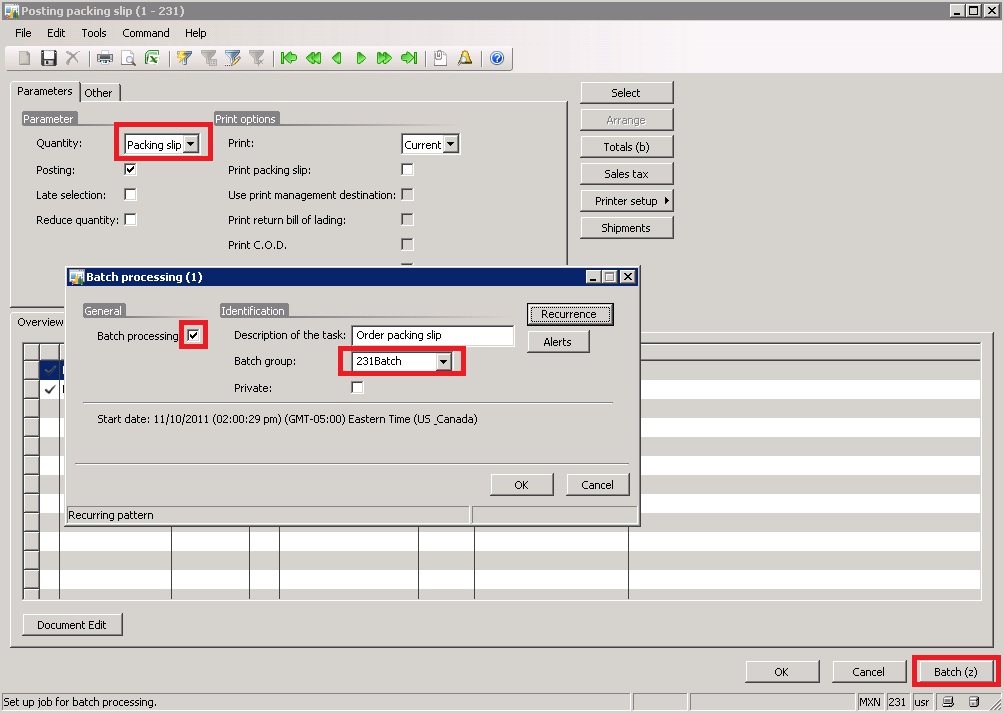


14- After clicking the OK button you should see the following message


If you want to check the status of your batch you can go to Basic > Inquiries >Batch Job. Your scheduled job should be in there. Wait a few minutes and the debugger should open at the breakpoint you inserted before.


NOTE: Sometimes you will have to restart the AOS service when the debugger does not open and your job has already executed. In addition, you MUST have a batch group setup.

Take Care!

Thursday, October 6, 2011

Standalone AOS and AOS Clusters

The following is an explanation of some of the possible combination we can have when it comes to AOS’s in our environments.

For what I have learned over the years, we can have several different AOS setups, starting from a single AOS environment (usually used in a development and/or test machine) to a multi AOS (cluster) environment.

So, the following are the differences (based on my opinion)


Standalone AOS Environment

It is obvious that this is the simplest configuration. Usually, I would follow this pattern when I have to create a development and/or test environment. The reason is that for development scenarios (in small –mid companies) we don’t deal with 70 – 80 developers at a time.

In addition, we can add (if we want to) extra AOS servers if the need to handle a larger number of users and/or connections is necessary. This will create a side by side configuration.


Multiple AOS’s (not clustered)

As stated earlier, we know that multiple AOS's in a single Ax environment can exist side by side. Typically the way it works is that a user will connect to the AOS that has been configured in the AX configuration Utility. However, if we were to have more than one AOS listed in the AX configuration utility, the first available will be used to fulfill the connection request by a client.

I guess that if we are listing (and using) more than one AOS in our AX configuration utility is a good thing as this will ensure that a connection is guaranteed to the client because it will use the first available(except if all the AOS servers are down of course).

Side Note:  When using multiple AOS’s we can also define how the user connects to it. For example, in the project I’m working on right now we deal with two different time zones (USA and Asia), so in our cluster we define that the users in Asia will connect to AOS Asia, and the users in the US to the AOS US.

I guess the side note above opened the conversation to yet another type of setup, and this is the Clustered AOS.


There are two types of cluster mode for AOS.

1-      Cluster mode without Load Balancer
2-      Cluster mode with Load balancer


Cluster mode without load balancer

When a client starts, it sends a request to the first server that is listed in the client configuration. When this happens, the server returns the list of active AOS instances in the cluster, sorted by workload.  Then, the client attempts to connect to the first AOS instance in the list, and if that connection fails, the client attempts to connect to the second AOS instance in the list, and so on.
It will be logical to conclude that the only criteria to manage the load is the number of clients that are connected to a specific AOS, this includes threads, BC, etc.


Cluster with load balancer

If we set up a cluster that includes a load balancer, the load balancing AOS instance is dedicated to distributing the user load (NOTE: A load balancer AOS does not require a license nor does process Microsoft Dynamics AX business logic or data)

Side Note: We need to ensure to set up all the client configurations to connect ONLY to the load balancing AOS instance.

So when a client starts, it connects to the load balancing AOS instance. Then, the load balancing AOS returns a list of active AOS servers (instances) that exist in the cluster, usually sorted by the workload. Then, the client attempts to connect to the first AOS instance in the list. If that connection fails, the client attempts to connect to the second AOS instance in the list, and so on.

So, we can conclude that this is very similar to the non-clustered AOS mode, and I guess the only difference using a configuration like this is that we can add and/or remove other AOS instances from the cluster without updating client any of the configurations, which is really cool. Now the question is, even though the Load Balancer AOS is kind of free, do we really need it? Or what happens if the Load balancer AOS fails?